
Automation will not make you better at your core craft. If you are an accountant, no script will spot a subtle tax deduction for you, and if you advise founders on brand strategy, software cannot sit across from a client and earn their trust. That work is yours. What wears people down is the mechanical paperwork surrounding those conversations. If you want to automate small business admin, you start right there, in the scramble between back-to-back video calls.
It is usually 11:50 in the morning. You have just finished a sharp discovery call. You agreed on four action items, promised to send over a deposit invoice, and your next meeting starts at midday.
Ten minutes.
In that window, your brain is supposed to flip from strategic consulting into pure data entry. You open an email tab, pull up your project management board, log into your bookkeeping software, and hunt down the call recording. You manage half of it before the calendar notification chimes for the next call. The rest gets pushed to five in the afternoon. By the time you shut your laptop, you have four half-remembered conversations and two hours of copy-pasting waiting for you before dinner. It is exhausting, and it is completely unnecessary.
The problem with all-in-one software
When business owners get fed up with this routine, the standard advice is almost always wrong. People tell you to buy an enterprise CRM or a massive all-in-one operations platform.
Do not do that.
For a solo operator or a team of three, enterprise platforms are pure deadweight. They cost hundreds of pounds a month, take weeks to configure, and demand that you change how you work to fit their rigid menus. You do not need two hundred features you will never touch.
You probably already have tools you like. You have your Google Workspace or Microsoft 365, your calendar, your video software, your accounting app, and maybe a simple project board like Trello or Notion. The problem is not your apps. The problem is that they sit in complete silence, refusing to speak to one another. You spend your day acting as the human conveyor belt, ferrying text from one tab to the next.
The arithmetic of a messy day
Look at what that manual tax actually costs a solo consultant running four calls in a day.
Here is the standard run of play after each conversation:
- Rewatching bits of the recording to grab action points: 10 minutes.
- Drafting and sending the recap email: 10 minutes.
- Setting up client folders and project boards: 5 minutes.
- Creating and sending the deposit invoice: 5 minutes.
That is 30 minutes of basic data entry per call.
Across four calls, you give up two hours every single day just shifting information between windows. Over a month, that is roughly forty working hours. A full working week burnt on clerical work that produces zero revenue and exercises zero brainpower.
What happens when your software talks to itself
Now run that exact same sequence with background connections quietly handling the hand-offs.
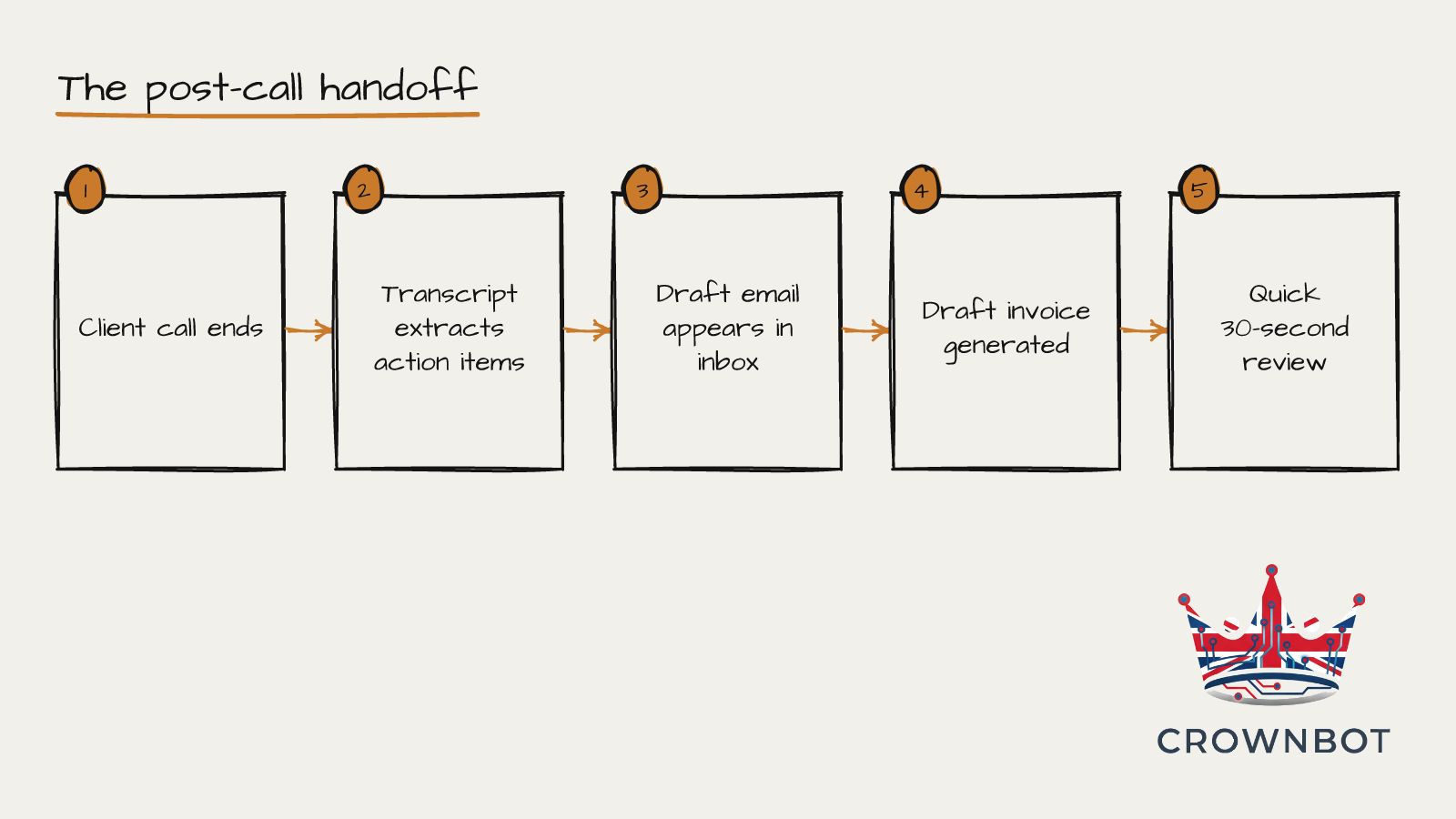
You hang up the call. Your recording tool wraps up its audio file and automatically sends the transcript to a background processor.
That processor runs through the text. It identifies decisions made, actions for the client, and actions for you. It drafts a clean follow-up email and places it directly into your email drafts folder. It does not send it. Sending automated emails to clients without looking at them is a terrible idea. You want your own eyes on the wording. But instead of typing from scratch, you open the draft, adjust one sentence, and click send.
While you do that, the background process has already created the new client record, added the action items to your task board, and set up a draft invoice in your accounting software.
When you look at your screen in that ten-minute gap between calls, the work is already laid out. You spend sixty seconds reviewing the draft email, hit send, and take a drink of water before your next call starts. The two-hour evening chore shrinks down to four minutes of total review across the whole day.
Meeting summaries and draft follow-ups
Stop scribbling notes on a pad while a prospect is explaining their business. Listen to them. Let your video platform record the call and route the finished transcript into a processor the second you leave. Have that processor structure the output into two clear lists: what you promised to do, and what the client promised to do. Then feed that text into a new message in your email drafts folder. You check it, make sure the tone sounds like you, and hit send.
Client setup without complex software
When someone agrees to hire you, they should not have to wait two days while you manually create their workspace. When a proposal is signed or an initial deposit clears, that event should trigger your background tools to generate their shared Google Drive folder, create their board in your project tool, and send out your standard welcome pack. The client gets an immediate, professional experience, and you never have to remember which folder sharing permissions to click.
Invoicing and payment hand-offs
Typing customer details into your invoicing tool at eight in the evening is an easy way to make billing errors. Connect your proposal or scheduling tool directly to your accounting platform. When an agreement is marked accepted, the draft invoice should be generated in your accounting software automatically, ready for you to approve. Once Stripe or your bank flags the payment as received, your project tracker updates on its own to show the deposit is paid.
Taking the friction out of your day
None of this is about replacing human judgment or turning your firm into an impersonal machine. It is about saving your energy for the parts of the job that actually pay the bills.
When you automate small business admin in the background, you stop losing your evenings to data entry. You run your calls, do your client work, and finish your day on time.
If your tools are currently acting like disconnected islands and you are tired of spending your evenings on copy-and-paste, look at where you lose the most time between calls this week. Pick the one manual step that annoys you most, map out which app needs to talk to which, and let us build the bridge between them.